


Great Weather
4.2229.00 Reviews
App Specs
- Version
- 1.3.5
- Updated On
- License
- Free
- Downloads
- 5,000,000+
- Developer
- 5660 BA, LLC
- Categories
- Weather
- Platform
- Android, iOS
Screenshots
 Analysis by AppCompare
Have you ever been caught in a rainstorm without an umbrella or left the house only to discover it’s sweltering hot? Well, I might just have found the app that’s going to save us from those weather woes. Let me introduce you to Great Weather, a nifty little app that’s been making waves recently. I decided to give it a spin to see if it lives up to the hype.
Readability and navigation in daily use
A weather app is most useful when I can understand it quickly, not when I have to explore several screens before finding the forecast. Great Weather’s uncluttered presentation, as described in my first impression, is a good fit for quick checks: I can focus on the information I need rather than working through a complicated menu. The app is a free weather app from 5660 BA, LLC, and its straightforward approach should appeal to people who want a forecast without turning weather-checking into a hobby.
The practical question is how to make that simplicity work for your routine. I’d use a brief glance at the current conditions to decide whether a coat or umbrella is sensible, then open the hourly forecast if my plans depend on timing. The longer outlook is better treated as a planning aid than a promise: it can help me compare possible days for an outing, while I’d check again closer to departure before making a weather-sensitive decision.
That distinction matters if you are deciding between this and the default weather app already on your phone. A built-in app is convenient and may be enough when you only need a quick local snapshot. Great Weather makes more sense if you value a dedicated place for forecasts, alerts, map browsing, and air-quality information. I wouldn’t switch solely because an app has a longer-looking forecast; I’d choose based on whether its presentation and available details fit the decisions I actually make.
Motor and sensory considerations
The clean layout can reduce the effort of finding information, especially for someone who prefers fewer competing elements on screen. Themes and layout customization, as described in the original review, may also help people make the display feel more comfortable and place preferred information where it is easier for them to find. Those options are useful only if they genuinely improve your own reading experience, so I’d take a moment to try a layout and theme rather than assume one setting works for everyone.
There is a trade-off between convenience and interruption. Weather alerts can be helpful when rain or extreme temperatures might change a commute, but frequent notifications can also distract or create unnecessary stress. I’d start with only the conditions that could alter my plans, then adjust the frequency if the alerts feel too frequent. If you rely on quiet periods, a less disruptive setup is likely more useful than enabling every possible warning.
For anyone who finds small controls or dense screens tiring, the best test is a real task: open the app, find the hourly outlook, and see whether the route feels comfortable without rushing. The app’s reported simplicity is encouraging, but individual needs differ, and a clear design does not automatically mean every element will suit every person. I’d keep a familiar alternative available until I know that the key information is easy for me to reach.
Worth Reading Before You Choose

Flipboard Shows What News Apps Must Do Beyond the Feed

Switching to Android Auto Means Rethinking Your Driving Routine

Google Calendar Makes a Crowded Week Easier to Manage

Ludo King Makes the Most of the Minutes Between Plans

Baby Panda World Brings Quick Play to Modern Phones, but Its Game Library Feels Busy

ESPN’s Live Game View Makes Following Close Games Easier
Situational access: planning around changing weather
A realistic use case is a morning commute with an outdoor walk at lunchtime. I’d check the day’s forecast before leaving, look at the hourly view for the period when I’ll be outside, and set a rain alert if getting wet would be more than a minor inconvenience. That workflow is more useful than repeatedly reopening the app to check the same conditions. It also gives the notifications a clear purpose instead of making them background noise.
The map and air-quality information add a different kind of context. A map can help when I’m considering a trip beyond my immediate neighborhood, while air quality can be relevant when deciding whether an outdoor activity feels sensible. Neither replaces local judgment: conditions can change, and a broad view is not the same as knowing how a particular street or route will feel. I’d use these tools to inform a decision, then check the local forecast again before setting out.
For travelers, the map may be more useful before a journey than during a busy stretch of travel, when there may be little time to zoom around and compare places. I’d use it while planning, then rely on a focused forecast for the destination when making immediate choices. If you need a specialized navigation or emergency tool, a general weather app is not a substitute for it; Great Weather is best treated as one practical source of weather context.
First Impressions Matter
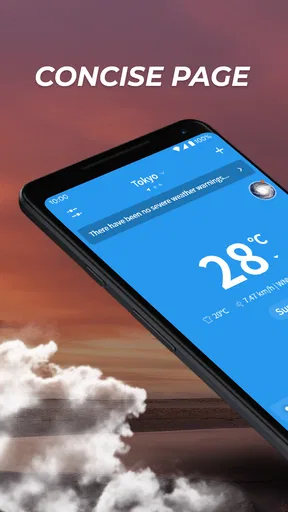
When I first downloaded Great Weather, I was immediately drawn to its slick design. The interface is clean, vibrant, and super user-friendly. No clutter, no overwhelming menus – just straightforward weather info at your fingertips. It’s like the app is saying, “Hey, I've got your back, rain or shine!”
Features That Shine
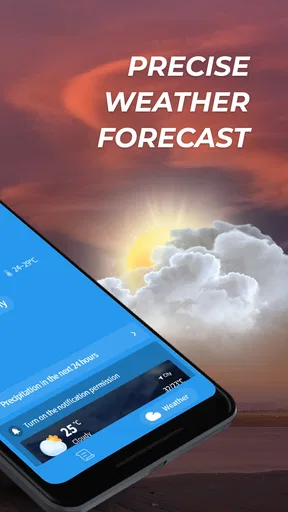
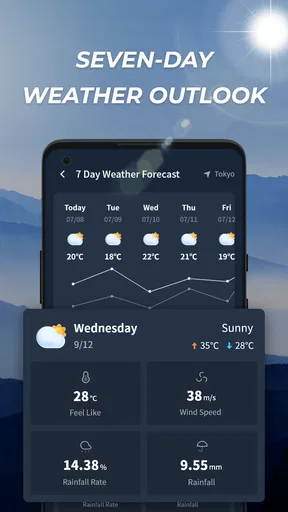
Now, let’s dive into the features. The app offers real-time weather updates, which is pretty standard, but it’s the accuracy and detail that really stand out. It provides hourly forecasts, which are perfect for those of us trying to plan our day down to the minute. The daily forecasts go up to 10 days ahead, so planning that weekend hike or beach day is a breeze.
One feature that really caught my eye is the weather map. It’s interactive and allows you to zoom in and out to see different parts of the world. It’s perfect for those of us who travel often or just like to know what’s happening weather-wise around the globe. Another cool addition is the air quality index, which is becoming more and more important these days.
Notifications and Customization
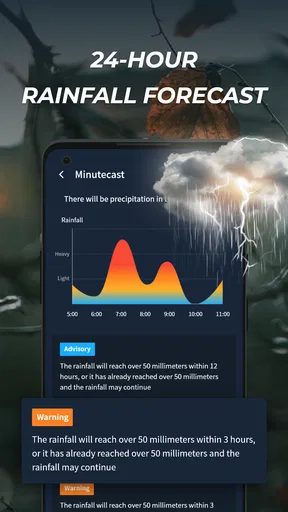
Notifications are where this app truly excels. You can customize alerts for specific weather conditions such as rain, snow, or extreme temperatures. No more waking up to an unexpected blizzard – unless you’re into that sort of surprise! The app allows you to set the notification frequency, so you’re not bombarded with alerts every other minute.
Customization doesn’t stop there. Great Weather lets you choose from a variety of themes and widgets. Want your weather updates in a bright sunny theme even when it’s cloudy outside? No problem! You can even adjust the app’s layout to prioritize the information most important to you.
Performance and Usability
I’ve been using Great Weather for a couple of weeks now, and I must say, it’s been performing like a champ. The updates are timely, and I haven’t experienced any crashes or bugs. The app runs smoothly, and the data loads quickly, which is crucial when you’re in a rush to check the weather before heading out.
Usability-wise, it’s as intuitive as it gets. Whether you’re tech-savvy or a total newbie, navigating through the app is a piece of cake. It’s designed to cater to a wide range of users, which I think is a huge plus.
Remaining barriers and reasonable expectations
Even a well-presented forecast has limits. Weather information is inherently uncertain, so I wouldn’t treat a long-range outlook as a guarantee or plan a costly, weather-dependent trip around it alone. I’d use the near-term details to make everyday choices and revisit the forecast when conditions matter. If you need highly specialized local observations or detailed tools for professional work, an app designed around those needs may serve you better.
Another consideration is how much information you want in one place. The combination of forecasts, alerts, a map, and air quality is handy, but users who want only a minimal glance might prefer the phone’s built-in weather view. Conversely, someone who needs a particular accessibility setting or a very specific display behavior should test the actual screens and controls before relying on it. A clean interface is a welcome start, not proof that every access need is covered.
The app is rated for Everyone, has an average rating of 4.0 from around 7,100 ratings, and has been installed over a million times. It was released on December 5, 2024, and version 1.3.2 requires Android 6.0 or later. Those details make it a broadly approachable option for compatible Android devices, though the best reason to keep it is whether its daily forecast and alert workflow fits your habits.
Who will get the most from it
I’d recommend giving it a try if you regularly coordinate errands, commuting, or outdoor plans around rain and temperature, and you prefer a readable forecast with options to tailor what you see. It may also suit someone who wants to check air quality alongside ordinary weather without juggling several information sources. Start with the local forecast and one useful alert, then add the map or other details only if they solve a real problem for you.
I’d skip it if your current weather app already answers your questions clearly, if notifications tend to distract you, or if your decisions require a level of specialist forecasting that a general-purpose app cannot provide. The same goes for anyone who finds its controls uncomfortable after trying them: keeping a familiar alternative is a sensible choice, not a failure to give the app a fair chance.
Why You Should Give It a Go
In a sea of weather apps, Great Weather stands out for its user-friendly design, detailed forecasts, and customization options. It’s a reliable companion for anyone looking to stay ahead of the weather curve, and let's be honest, who doesn’t want that?
Overall, if you’re tired of being caught off guard by the weather or just want a more personalized forecasting experience, this app is definitely worth a download. So, go ahead, check it out, and never let the weather rain on your parade again!
Inclusive verdict
My overall view is that this is a convenient choice for people who want weather information presented without much fuss, with enough extra context to support everyday planning. Its greatest strength is not that it can remove uncertainty, but that its different views and optional alerts can help you ask the right question at the right time: whether to carry an umbrella, shift an outdoor plan, or check conditions before travelling.
Because it is free, trying it alongside your existing weather app is a low-commitment way to judge whether its layout works for you. I’d compare the same local forecast in both apps for a few days, notice which one is easier to read and act on, and keep the one that fits your routine. For me, Great Weather is most compelling when its customization and extra context make a real task simpler; if they don’t, a simpler or more specialized alternative may be the better fit.
Pros
- User-friendly interface for quick navigation.
- Accurate real-time weather updates.
- Customizable alerts for severe weather.
- Detailed forecasts for multiple locations.
- Supports offline weather data access.
Cons
- Ads can be intrusive at times.
- Limited theme customization options.
- Requires frequent updates for accuracy.
- Battery consumption can be high.
- Some features require a subscription.
FAQs for Great Weather
What features does Great Weather offer compared to other weather apps?
Great Weather provides a comprehensive suite of features including real-time weather updates, a 7-day forecast, radar maps, and severe weather alerts. It also offers detailed information such as humidity, wind speed, and UV index. The app is designed with an intuitive interface and customizable widgets, making it a standout choice.
Is Great Weather available for both Android and iOS devices?
Yes, Great Weather is available for download on both Android and iOS platforms. Users can find it on the Google Play Store and the Apple App Store. It's optimized for various devices to ensure a seamless experience whether you're using a smartphone or a tablet.
Does Great Weather require a subscription for full access?
Great Weather offers both free and premium versions. The free version provides essential features, while the premium subscription unlocks additional benefits like advanced radar features, ad-free experience, and personalized weather alerts. Users can choose based on their needs and budget.
How accurate is the weather information provided by Great Weather?
Great Weather sources its data from reliable meteorological agencies and uses advanced algorithms to provide accurate and timely weather updates. However, like any weather app, the accuracy can vary based on location and changing weather conditions. Users are encouraged to check updates frequently.
Can I customize the notifications in Great Weather?
Yes, Great Weather allows extensive customization of notifications. Users can set alerts for severe weather conditions, daily forecasts, and specific weather changes. The app ensures that you receive timely notifications tailored to your preferences, keeping you prepared for any weather scenario.


